


ReArty: AI Photo, Video Maker
4.448.00 Reviews
App Specs
- Version
- 2.9.0
- Updated On
- License
- Free
- Downloads
- 10,000+
- Developer
- BlazeTech LTD
- Categories
- Art & Design
- Platform
- Android
Screenshots
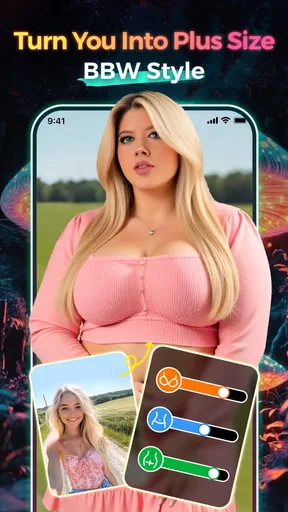
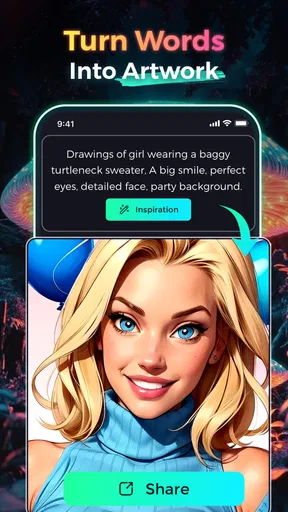
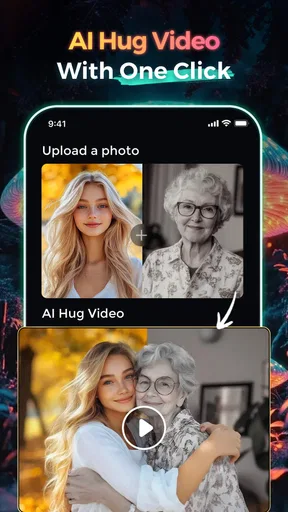
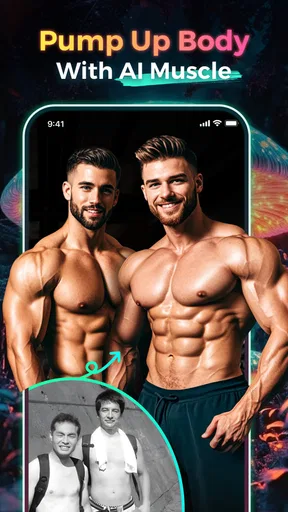

 Analysis by AppCompare
ReArty: AI Photo, Video Maker is the kind of Art & Design app I open when I want a quick visual experiment rather than a full editing session. It brings AI photo creation, AI video generation, headshot work, image editing, and a body-shape filter into one mobile-focused experience. I found that combination appealing because it removes the need to jump between several specialized tools, although the convenience comes with the usual trade-off: the more jobs an AI editor tries to handle, the less predictable each result can feel.
Developed by BlazeTech LTD, ReArty is free to install, with optional in-app purchases ranging from $4.99 to $29.99 per item. It is aimed at Teen users and runs on Android 7.0 or later. The app was released on Dec 13, 2024, and its current version is 2.9.0. Those details matter if you are using an older phone or deciding whether a free download is enough for your needs.
My overall impression is that ReArty works best as a creative shortcut. I would recommend it to someone who wants to turn a selfie into a more polished portrait, test an AI art idea, or make a short visual piece without learning a desktop editor. I would be more cautious about recommending it to a professional designer who needs exact control, repeatable output, or a carefully managed production workflow.
How ReArty feels when the connection becomes part of the workflow
I find that connection is not just a background requirement here; it shapes how I plan each creative session. Before I start, I decide which image matters most and what I want to learn from the result, so a slow or interrupted request does not turn into a string of aimless retries. That small bit of preparation also makes it easier to move a finished image into the next step: checking it carefully, choosing where it belongs, and deciding whether it is ready to share.
Why network access changes the first impression
The most important practical point is that ReArty is built around AI generation, so the experience is closely tied to connectivity. Tasks such as creating an image, transforming a portrait, or producing an AI video involve sending a request and waiting for a result. When the connection is steady, that process feels simple: choose a direction, provide an image or prompt where appropriate, and let the app process the idea.
That simplicity can hide how much patience the workflow needs. I tend to notice the difference between a strong home connection and a busy mobile connection most when I am trying several variations. A single attempt may be easy to tolerate, but repeated experimentation can become frustrating if every request takes longer than expected or needs to be submitted again.
I would not treat ReArty like a conventional photo editor that is always ready for instant cropping, color adjustment, or drawing. Its appeal is the transformation stage, and that stage is more dependent on a responsive connection than ordinary touch-based editing. If you are choosing an app for a flight, a rural trip, or a place with unreliable service, a standard offline editor is the safer companion for basic work.
Worth Reading Before You Choose

EA SPORTS FC Mobile 26 Is a Bigger Football Game, but It Takes Time

Flipboard Shows What News Apps Must Do Beyond the Feed

Switching to Android Auto Means Rethinking Your Driving Routine

Google Calendar Makes a Crowded Week Easier to Manage

Ludo King Makes the Most of the Minutes Between Plans

Baby Panda World Brings Quick Play to Modern Phones, but Its Game Library Feels Busy
There is also a creative consequence. Because each generated result takes time and may require another attempt, I found it useful to decide what I wanted before starting. A vague idea such as “make this look better” is less helpful than a clear goal like “create a clean professional portrait with a simple background.” More specific direction reduces wasted attempts and makes the wait feel worthwhile.
A realistic everyday scenario
Imagine that I need a profile image for a community group after work. I have a reasonably well-lit selfie, but the background is cluttered and the framing is casual. ReArty is attractive in that moment because I can try an AI headshot-style treatment from my phone instead of opening a desktop program, removing the background manually, and adjusting the portrait piece by piece.
The practical workflow is not just about tapping a button. I would first choose the clearest source photo, preferably one where my face is visible and not partly hidden by hair, sunglasses, or a dramatic shadow. I would then submit one focused request rather than changing several visual goals at once. If the first result looks artificial, I would return to the source image and simplify the request instead of assuming that more effects will fix it.
This is one of the app’s strongest everyday uses: reducing the distance between an idea and a shareable result. It is not necessarily the best route for a formal business portrait that must match a company style exactly, but it can be a convenient way to produce a presentable first draft or a social profile image.
Using it in short mobile sessions
ReArty makes the most sense when I have a few minutes and a clear visual task. I can imagine using it while waiting for an appointment, preparing a birthday post, or testing a concept for a small personal project. The mobile format encourages quick decisions, and the mix of photo, video, and art tools means I do not need to plan a large editing session around one specific type of media.
At the same time, mobile convenience should not be confused with unlimited flexibility. A phone screen is comfortable for selecting a source image and reviewing a result, but it is less suitable for judging tiny facial details, subtle edges, or fine visual artifacts. I prefer to inspect important results at a larger size before publishing them, especially when the image will represent me publicly.
For video, this matters even more. A result that looks convincing in a small preview may reveal strange movement, inconsistent details, or an awkward transition when watched carefully. ReArty is useful for making a quick visual idea, but I would not skip a proper review simply because the generation process felt effortless.
What happens when a request fails
AI tools are rarely perfectly predictable, and ReArty should be approached with that expectation. A source photo can be technically usable but still produce an unconvincing transformation. Faces, hands, text, jewelry, patterned clothing, and busy backgrounds are all areas where generated imagery can become less reliable. When that happens, the best recovery method is usually to change the input rather than repeatedly forcing the same request.
I would keep a small set of alternative source images ready. A front-facing portrait, a three-quarter view, and a simpler background can lead to noticeably different outcomes. This is a more useful habit than treating every failed result as a software problem. If the app produces a strange face or distorted object, I would try a cleaner photo and a narrower visual instruction before spending more time on effects.
Connectivity failures require a different kind of recovery. If a generation stalls, I would first check whether the result has actually completed before submitting again, because repeated taps can create confusion about which request is active. If the app returns to an earlier screen, I would save the original image outside the editing session and note the prompt or intended style so I can rebuild the request without starting from memory.
This is also where I see a limitation compared with a traditional editor. In a manual app, a failed adjustment usually affects one step that I can undo. In an AI workflow, an unsatisfactory result may require a new generation, a different source image, or a revised instruction. The process is faster when it works, but less granular when it does not.
Being careful with mobile data
AI photos and videos can involve more processing than a simple filter, so I would use ReArty thoughtfully on a limited mobile plan. I would avoid generating many variations just for curiosity when I am away from Wi-Fi, particularly for video tasks. A practical approach is to prepare the source images and ideas first, then run the actual generation when the connection is stable and data use is less concerning.
That habit also improves creative quality. Instead of making random attempts, I can compare the purpose of each variation: one portrait for a profile, one artistic version for a post, or one short video concept for a story. Fewer, better-planned requests make the app feel more controlled and reduce the chance of wasting time and connectivity on results I would never use.
I would also think carefully before uploading a sensitive photo. ReArty is designed for visual transformations, so the images I choose should be ones I am comfortable processing through an AI service. I would avoid using private documents, confidential work material, or pictures of other people without their permission. This is not a criticism unique to ReArty; it is simply a sensible boundary for any cloud-oriented creative tool.
The same caution applies to the body-shape filter. A playful transformation can be entertaining, but it is worth remembering that edited proportions are not a reliable reflection of real appearance. I see this feature as an effect for experimentation, not as a standard that users should compare themselves against. That distinction makes the tool more enjoyable and avoids turning a novelty filter into a source of unnecessary pressure.
Comparing it with familiar alternatives
Compared with a conventional photo editor, ReArty offers more automation and less manual control. A traditional editor is better when I need to remove a small blemish, place text at an exact position, match colors across a set of images, or make a precise crop. ReArty is more appealing when the goal is a broader transformation: a new artistic mood, a headshot-style reinterpretation, or an AI-generated visual concept.
Compared with a dedicated video editor, its advantage is variety rather than timeline depth. Someone who needs multiple tracks, detailed timing, carefully placed captions, or frame-by-frame decisions will probably be happier with a specialized video application. ReArty makes more sense for a person who wants to explore AI video creation without committing to a complex editing workflow.
It also differs from using separate AI art, portrait, and video apps. Keeping those functions together is convenient, especially on a phone with limited storage or for a user who dislikes learning several interfaces. The trade-off is that a single general-purpose app may not match the strongest specialized tool in every area. I would choose ReArty for breadth and experimentation, not because it replaces every professional alternative.
Who will get the most from it
ReArty is a good fit for casual creators, social media users, students working on visual concepts, and anyone who enjoys trying different looks without mastering advanced editing software. It can also help someone who needs a quick starting point for a profile image or wants to turn an ordinary photo into something more expressive.
The free entry point makes it easy to test the basic experience before deciding whether optional purchases are worthwhile. I would still pay attention to how often I generate content and whether the available result quality matches my expectations before spending money. A person who only needs occasional creative edits may find the free access sufficient, while a frequent user should consider the cost of repeated in-app purchases as part of the overall decision.
The Teen content rating is another reason I would treat the app as a creative tool for supervised, sensible use rather than an unrestricted image playground. Parents and younger users should discuss what kinds of photos are appropriate to upload and how generated images should be shared. The ability to alter a portrait does not remove the need for consent or good judgment.
Who should choose something else
I would skip ReArty if my main requirement were exact, repeatable editing. For product photography, detailed brand work, technical diagrams, or a professional video timeline, manual tools provide more dependable control. AI generation can produce attractive surprises, but surprises are not always useful when every element needs to be approved.
I would also hesitate if I mainly work in places with unstable connectivity. The app’s central appeal depends on being able to submit creative tasks and receive processed results. A conventional editor with dependable local tools would be a better primary choice in that situation, with ReArty reserved for moments when I have a stronger connection.
Finally, people who dislike experimenting may find the process tiring. The app is most rewarding when I am willing to compare alternatives and accept that the first result may not be the best one. If I want one predictable filter with no decisions, a simpler camera app would probably feel more comfortable.
My practical way of using it
I get better results by treating the app as a small creative studio rather than a magic correction button. I start with a clean source image, define one purpose, and make only a few meaningful changes between attempts. For a headshot, I prioritize facial clarity and a simple background. For AI art, I accept more variation but still keep the subject and mood specific. For video, I check the entire result instead of judging it from a single frame.
I also separate creation from publishing. First I generate and inspect the result; then I decide whether it is suitable for a profile, message, post, or personal experiment. This prevents the excitement of a new effect from making the final decision for me. It is especially useful with body-shape edits and heavily stylized portraits, where an image can be technically successful but still feel inappropriate for the intended audience.
ReArty has earned a 4.4 average from around 138 ratings, with about 48 written reviews and over 10K installs. That gives the app a growing early audience, while also suggesting that I should judge it by my own workflow rather than treating its current reception as a guarantee. Its relatively recent release and current version, 2.9.0, fit the impression of a product still worth exploring as its creative direction develops.
Final connectivity verdict
My verdict is positive, with clear limits. ReArty is a convenient free Art & Design app when I want AI-assisted photos, portraits, art, or video ideas from a phone. Its biggest strength is the range of creative directions in one place. Its biggest weakness is that the same AI-driven convenience makes results, waiting time, and network conditions part of the experience.
Choose ReArty for fast visual experimentation, not precision production. Use a stable connection, prepare better source images, keep mobile data in mind, and review every generated result before sharing it. If that sounds like a fair trade, the app is worth trying. If you need offline reliability, exact controls, or a complete professional timeline, I would make a traditional editor your main tool instead.
For me, the app works best as a creative companion: something I open when I have an idea and want to see several possible versions quickly. I would not rely on it for every editing job, but I would recommend it to a friend who wants an approachable way to explore AI visuals without assembling a collection of separate apps.
Pros
- AI tools quickly turn photos into creative edits and short videos.
- Useful templates make social media content easy to produce.
- Simple interface is approachable for beginners.
- Supports multiple visual styles for varied results.
- Fast previews help test ideas without complex editing skills.
Cons
- Some advanced effects may require a paid subscription.
- AI results can vary depending on photo quality and lighting.
- Heavy video effects may drain battery quickly.
- Export options may be limited on the free plan.
- Generated designs may feel repetitive after frequent use.
FAQs for ReArty: AI Photo, Video Maker
What is ReArty: AI Photo, Video Maker used for?
ReArty: AI Photo, Video Maker is a creative editing app designed for turning ordinary photos and videos into stylized visual content. It typically combines AI-powered effects, artistic filters, templates, animations, and editing tools in one workspace. You can use it to create profile pictures, social media posts, short videos, slideshows, and imaginative artwork without needing advanced photo or video editing experience.
Does ReArty require editing skills or technical experience?
No advanced editing knowledge is generally required to use ReArty. The app is built around presets, guided effects, templates, and relatively simple controls, so beginners can start by importing a photo or video and choosing a visual style. More experienced users may also appreciate the ability to adjust selected effects and combine different creative tools, although the available control level can vary by feature.
Is ReArty: AI Photo, Video Maker free to download and use?
ReArty may be available as a free download, but some tools, effects, templates, export options, or premium content can require in-app purchases or a subscription. Before starting a trial, carefully check the pricing, renewal terms, and cancellation instructions shown in the app store. Free features may also include limitations such as advertisements, watermarks, lower export quality, or restricted access to newer AI effects.
What photos and videos work best with ReArty’s AI effects?
For the most consistent results, use clear photos with good lighting, visible faces, and a relatively simple background. Portraits usually work better when the subject is centered and not hidden by sunglasses, hats, or other objects. For video effects, short clips with steady movement and sufficient resolution are often easier to process. Results can differ depending on the original media, selected style, and the app’s processing system.
Are there privacy considerations when using ReArty?
Before uploading personal photos or videos, review ReArty’s privacy policy and the permissions requested by the app. AI processing may occur on the device or through online servers, depending on the feature, which can affect how your media is handled. Avoid uploading sensitive documents or private images unless you understand the storage and deletion practices. Also check whether the app requests access to your camera, photo library, microphone, or notifications.


